Context menus and copy/paste
Right-click a band for band actions, or right-click empty graph space for actions on all bands. Both menus include Cut, Copy and Paste for moving bands between instances and projects.
The graph menu
Right-click empty graph space for actions on every band:
- Select All.
- Disable All (or Enable All once every band is bypassed).
- Select Disabled and Remove Disabled, for all bypassed bands.
- Clear Graph removes every band.
- Invert Gain turns boosts into cuts and cuts into boosts.
- Cut, Copy and Paste.
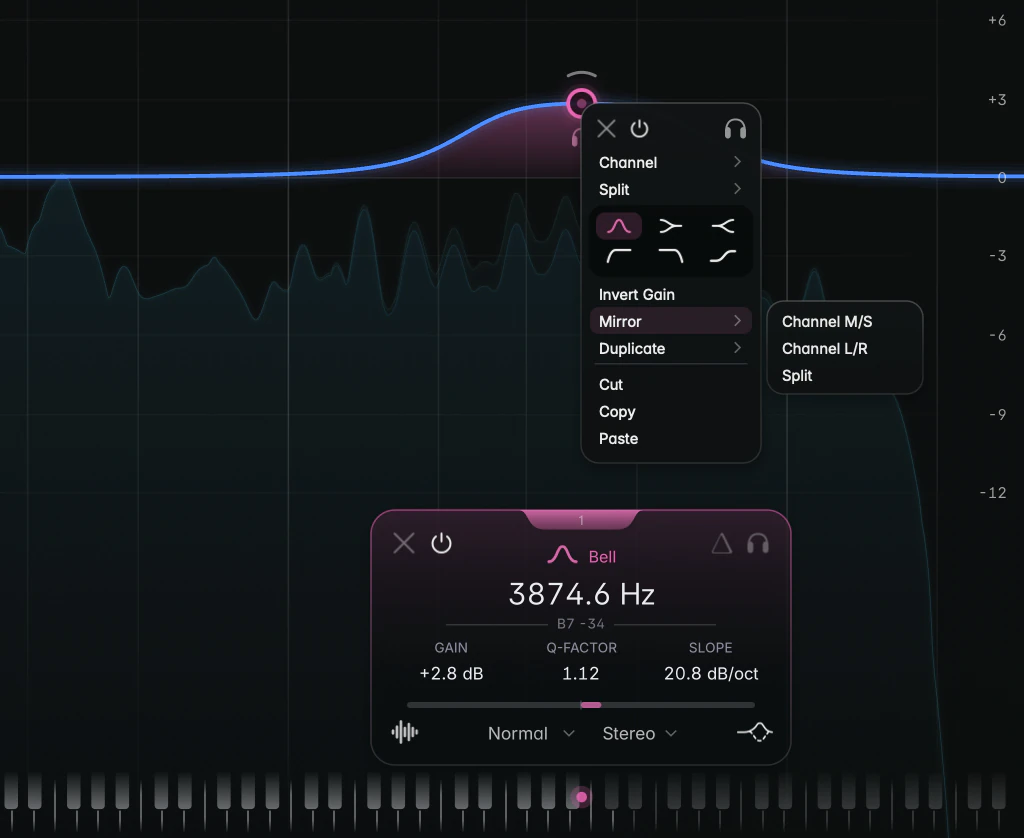
The band menu
Right-click a band’s node or curve. The menu acts on that band, or on the whole selection if the band is part of one:
- Remove, Band Bypass and Solo icons.
- Channel submenu: Stereo, Left, Right, Mid or Side (see Stereo placement).
- Split submenu: Normal, Transient or Body (see Transient / Body split).
- Shape grid with the six most common shapes.
- Invert Gain, Mirror (or Separate), Duplicate, Cut, Copy and Paste.
Mirror and Separate
Mirror creates an opposite partner for each band: a copy with the gain flipped, on the paired channel or layer.
- On a Stereo band, Channel M/S moves the original to Mid and puts the copy on Side, and Channel L/R does the same with Left and Right.
- On a band that’s already on a channel, Channel pairs Left with Right and Mid with Side.
- Split pairs the Transient and Body layers.
A +2 dB Side Bell at 5 kHz, mirrored, gets a -2 dB partner on Mid at the same frequency.
For cuts, Notch, Band Pass and All Pass, which have no gain, the row reads Separate and places the same filter on the other side of the pair.
Duplicate
Duplicate works on Bells:
- Harmonics adds copies at 2, 3, 4 and more times the frequency, each a little shallower than the last, and selects them all so one gain drag deepens or relaxes the whole series. Use it to address a resonance and its overtones.
- Octave Up and Octave Down add a copy one octave above or below.
On a Pitch-Tracked Bell the submenu offers Next Harmonic and Previous Harmonic instead.
Cut, Copy and Paste
Copy puts the bands on your computer’s clipboard with every setting; Cut copies and then removes them; Paste adds them as new bands. Because it’s the system clipboard, you can paste into another JustAnother EQ instance, or into a different project later. Pasting into another instance puts the bands exactly where they were.
Notes
- Paste, Mirror and Duplicate need enough free bands for everything they create; otherwise “Maximum of 24 bands reached” appears.
- Clear Graph, Remove Disabled and Cut act without asking, but every menu action is a single Undo step.