Settings
Click the gear icon in the JustAnother EQ header, just left of the meter dot, to open the Settings popup. Its three columns, ANALYZER, OPTIONS and GENERAL, hold the analyzer look, a few workflow options and the interface scale. Click the gear again, or outside the popup, to close it.
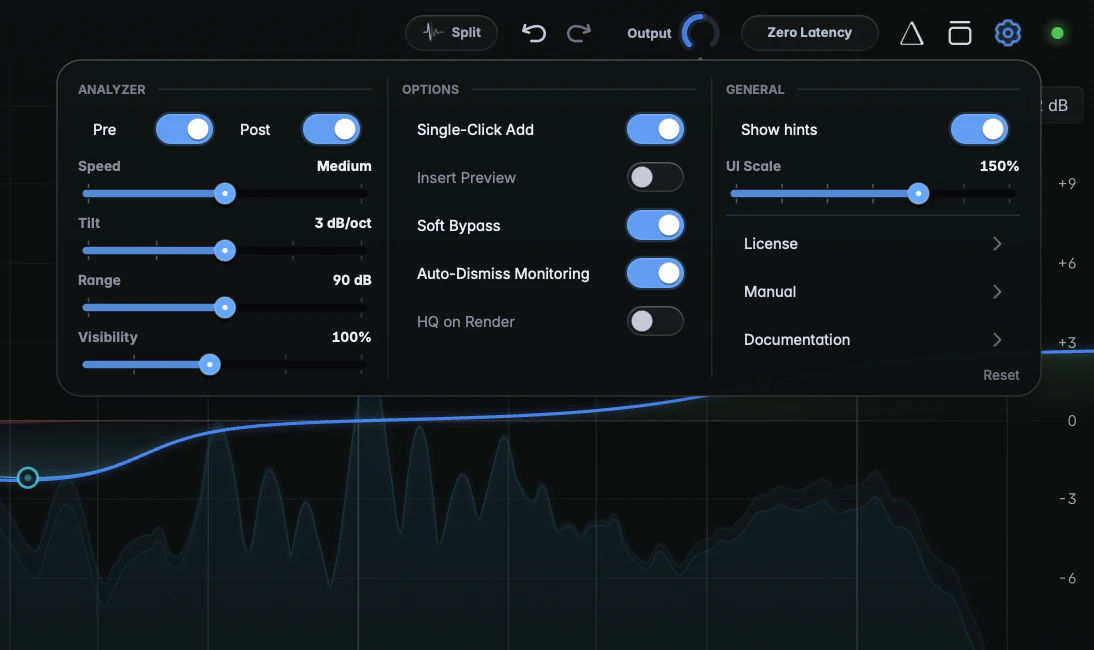
ANALYZER
Pre, Post, Speed, Tilt, Range and Visibility control the look of the analyzer; they’re described on Spectrum analyzer. Range also sets the scale of the output meter.
OPTIONS
- Soft Bypass (default on): keeps Channel Listen and split listen audible while Bypass is on, for a direct before/after comparison. See Output, Auto Gain and Bypass.
- Auto-Dismiss Monitoring (default on): closing the plugin window switches off Solo, Delta and the listen modes. Switch it off to keep them running with the window closed; sidechain listen always stops when the window closes.
- Single-Click Add (default off): a single click on empty graph space creates a band, left unselected so you can drop several in a row.
- HQ on Render (default off): switches HQ saturation on automatically for offline bounces and exports. See HQ mode.
GENERAL
- Insert Preview (default off): resting the pointer on empty graph space previews the band a click would create.
- Show hints (default on): switches the hover hints on and off.
- UI Scale (50 to 200 %, default 100 %): makes the whole interface bigger or smaller. See Window size and UI scale.
- License opens the license screen. See Activation and trial.
- Manual opens the short PDF manual built into the plugin.
- Documentation opens this documentation online (justanother.audio/docs/justanother-eq).
Reset
Reset, at the bottom right, puts every setting above back to its default and sets the window back to 1200 x 700. Click it once, then click Reset again to confirm, or Cancel to back out. It doesn’t touch your bands, and it can’t be undone.
Where settings are stored
Apart from Pre and Post, these settings apply to every instance of JustAnother EQ in every DAW: change one anywhere and it applies to every instance you open from then on. They aren’t part of presets. They’re stored in one file:
- macOS:
~/Library/Application Support/JustAnother Audio/JustAnother EQ.settings - Windows:
C:\Users\<your name>\AppData\Roaming\JustAnother Audio\JustAnother EQ.settings
Pre and Post are on again whenever you reopen a project or insert a new instance.