Pitch Tracking
Pitch Tracking makes a band’s frequency follow the detected pitch in real time, including vibrato and slides. The band maintains a chosen harmonic relationship to the note. This can be used for a vocal or bass resonance that changes frequency with the melody.
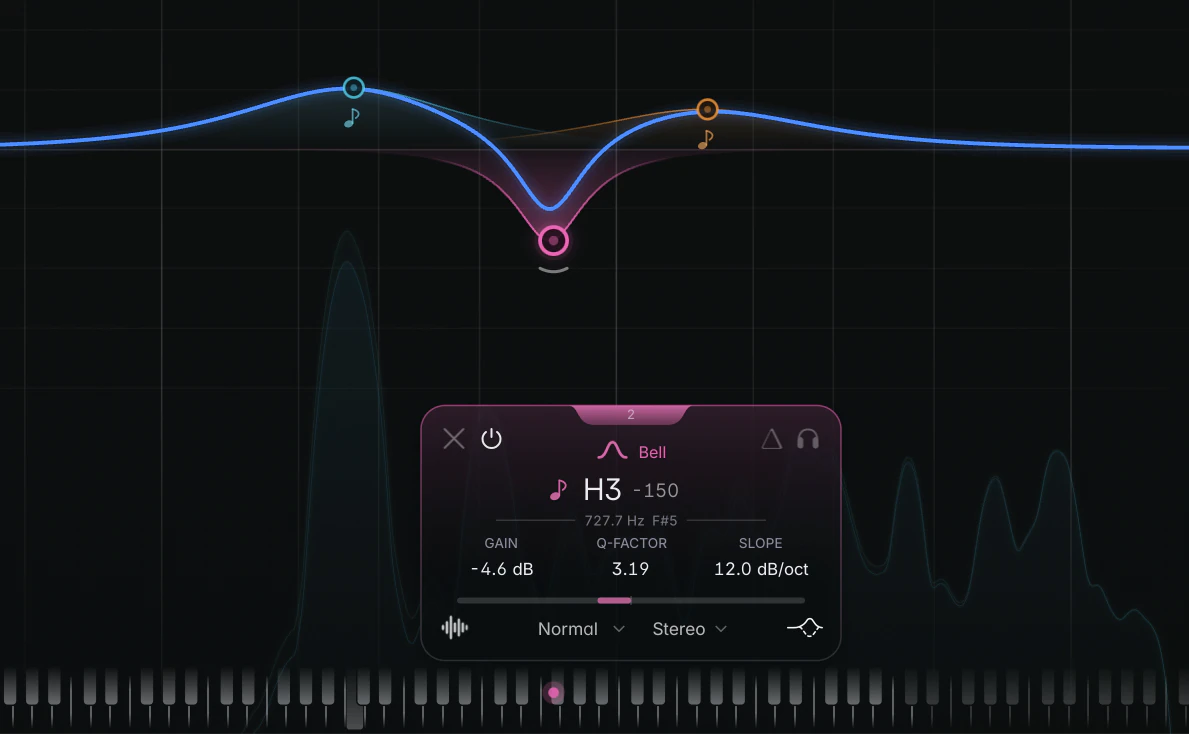
Turning it on
Hover the frequency row on the band card and click the small note icon left of the frequency. It lights up in the band colour; click it again to switch tracking off.
Pitch Tracking works with every filter shape. Bells, Notches, Band Passes and All Passes follow the chosen harmonic, cuts move their cutoff, and shelves and tilts move their corner or pivot. For example, a Low Cut can follow just below a bass line’s fundamental to reduce rumble.
To set the tracking interval: find the resonance on one note, leave the band there, and click the icon while the note plays. The band keeps that interval to the detected pitch. If no note is playing yet, the band waits and moves to the fundamental when the first note arrives.
When you switch tracking off, the band stays where it was tracked to. So you can also use Pitch Tracking to find a moving resonance, then switch it off to leave the band parked there.
The Harmonic
While a band tracks, the frequency on the card shows the Harmonic: where the band sits relative to the detected note.
- H1 is the note itself, H2 one octave above, H3 an octave and a fifth above, H4 two octaves above, and so on up to H16.
- A number after it is an offset in cents (100 cents = one semitone): “H2 +38” sits 38 cents above the second harmonic.
With a band on H2, a sung A3 (220 Hz) puts the band at 440 Hz; when the singer moves up to C4, the band moves to about 523 Hz.
Drag the readout to step through the harmonics, or Alt+drag (Option+drag on macOS) to fine-tune in cents. You can also double-click it to type a value such as “H3” or “H2 +38”, or drag the band’s node on the graph. The line under the readout shows the live frequency and note.
Click the tuning-fork icon next to the harmonic to open Pitch Tracking Settings.
What the tracker can follow
The tracker is built for one note at a time: a lead vocal, a bass line, a solo instrument.
- Monophonic only. On chords, the band holds the last single note until the material is back to single notes.
- Fundamentals from 30 Hz to 5 kHz. Through the harmonic, the band itself can go higher.
- It holds through silence. On breaths, consonants and pauses, the band stays on the last confident note instead of springing back.
- Bypassed bands keep tracking, so a band you switch back on is already on pitch.
Latency
Pitch Tracking adds about 46 ms of latency at 44.1 kHz while any band has it switched on, even if that band is bypassed. Your host compensates automatically. See Latency.
What else changes on a tracked band
- In Linear Phase mode, a tracked band runs its own zero-latency filters, because it moves faster than a linear-phase filter can follow. See Zero Latency bands.
- Spectral dynamics aren’t available while tracking; the band runs Broadband dynamics instead. Your Spectral setting comes back when you switch tracking off.
- Hold to Listen isn’t offered on a tracked band; use Solo on the band card instead.
- Pitch Tracking settings are saved with your session and presets, but can’t be automated. To ride a tracked band in the mix, automate its on/off or its gain.
Tips
- To follow several harmonics at once, right-click a tracked Bell band and choose Duplicate > Next Harmonic or Previous Harmonic. See Context menus and copy/paste.