Split Settings
The Split Settings popup is where you tell JustAnother EQ what counts as an attack. Click the Split button in the header to open it. The settings are global: they shape the Transient and Body layers for every band that uses them (see Transient / Body split).
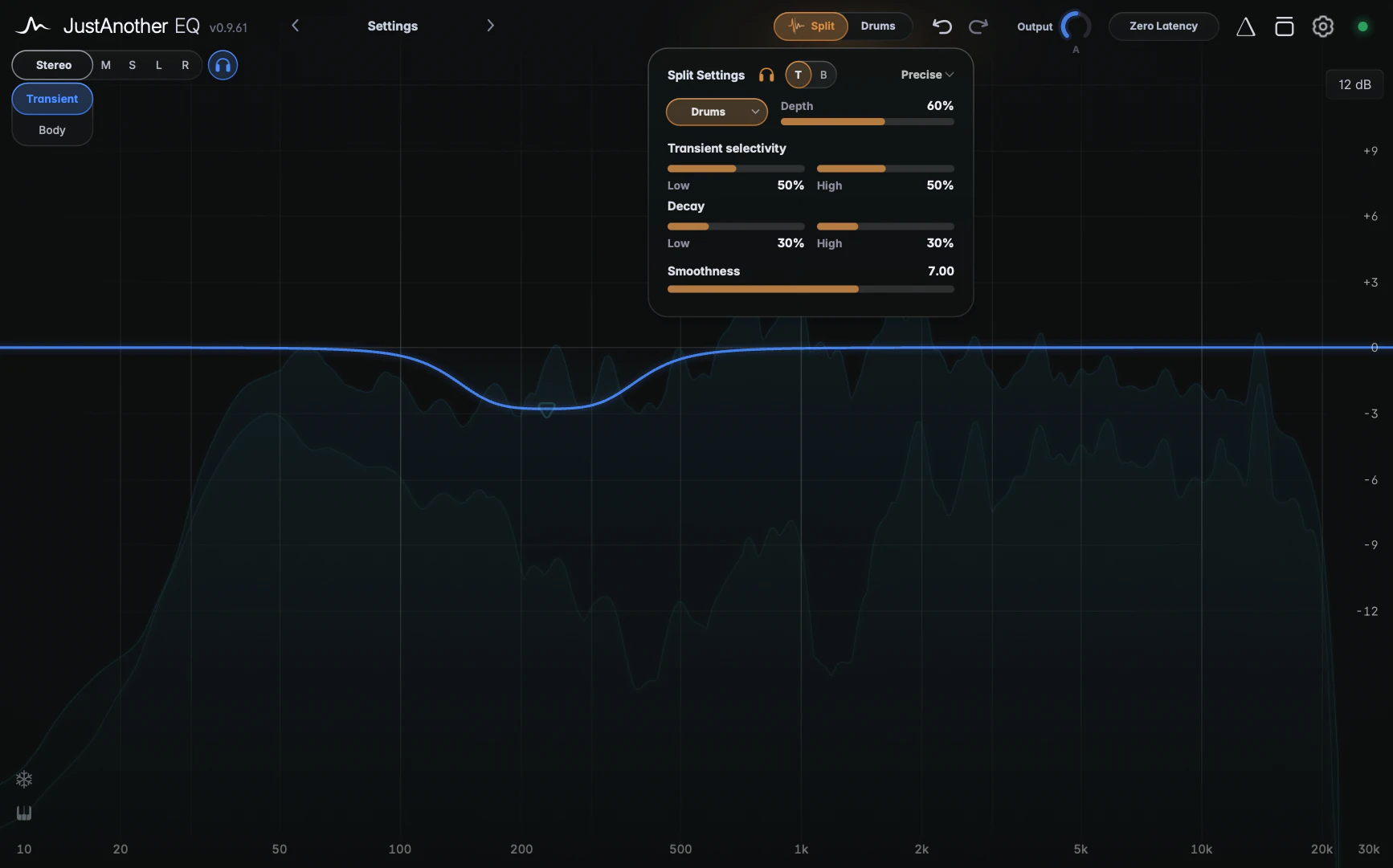
Split presets
The amber pill at the top left selects detector settings for your source. These Split presets only tune the detector; they are separate from the user presets in the header.
- Full Mix (default): general-purpose detector settings.
- Drums: only real stick and edge attacks go to Transient; cymbal wash stays in Body.
- Bass: catches swells and legato notes as well as plucks.
- Vocal: keeps chest tone in Body, with firm plosives and onsets going to Transient; sibilants and breathy consonants ride out in the Transient layer.
- Keys: the hammer goes to Transient; ringing partials and pedal wash stay in Body.
- Guitars: tuned for pick attack and strums.
- Custom: shows the raw detector controls instead (see below).
Depth and the preset sliders
Depth (0 to 100 %, default 50 %) sets how strongly the two layers are separated. Higher values isolate them more, allowing stronger layer-specific EQ, but can sound less natural. Lower values give a softer separation.
With a material preset you also get:
- Transient selectivity, Low and High (0 to 100 %, default 50 %): how pronounced an attack has to be to count as Transient. Higher is stricter.
- Decay, Low and High (0 to 100 %, default 30 %): how long energy stays in Transient before it returns to Body. Higher carries more of the resonance along with the hit; lower isolates just the initial impact.
- Smoothness (1.00 to 10.00, default 7.00): how Body comes back in after a transient. Higher gives a gentler fade-in.
Low applies to the bottom of the spectrum and High to the top.
Detector
The dropdown at the top right chooses the detection engine:
- Precise (default): tight lows and consistent detection of repeated hits.
- Precise+: follows the very fastest attacks, at a higher CPU cost.
- Classic: more direct in character, but it may miss quieter hits.
Start with Precise. Try Precise+ if very fast attacks, such as a snare roll or a busy hi-hat, aren’t detected consistently.
Custom
Custom replaces the preset sliders with the raw detector controls, each with a Low and a High slider: Low Hz (the two crossover frequencies between the Low and High settings), Threshold (0.100 to 1.000, default 0.500; higher gives less Transient content), Baseline (Classic detector only) and Decay. Depth and Smoothness are shared with the material presets. Custom keeps its own values; it doesn’t copy the preset you came from.
Split listen
Click the headphones icon next to the title to hear a layer on its own, then click T for Transient or B for Body. You hear the layer with the EQ of its bands, but without the Normal bands, so you’re hearing the split itself. Click the headphones again to stop.
Split listen works even with no Transient or Body bands; the split’s latency (about 93 ms at 44.1 kHz) is then only added while you listen.
Tips
- Check the detector by listening: switch on split listen, pick T, and adjust Transient selectivity and Decay to isolate the intended attacks. Then switch to B to check the sustain.
- Everything here is saved with your session and in presets. Depth, Transient selectivity, the material presets’ Decay and Smoothness can be automated; the preset, the detector and the Custom-only controls can’t.