Processing modes
The Processing pill in the header chooses the filter mode. Zero Latency uses minimum-phase filters, which add no delay but change phase. Linear Phase uses the same EQ curve while preserving the timing between frequencies, at the cost of latency and possible pre-ringing.
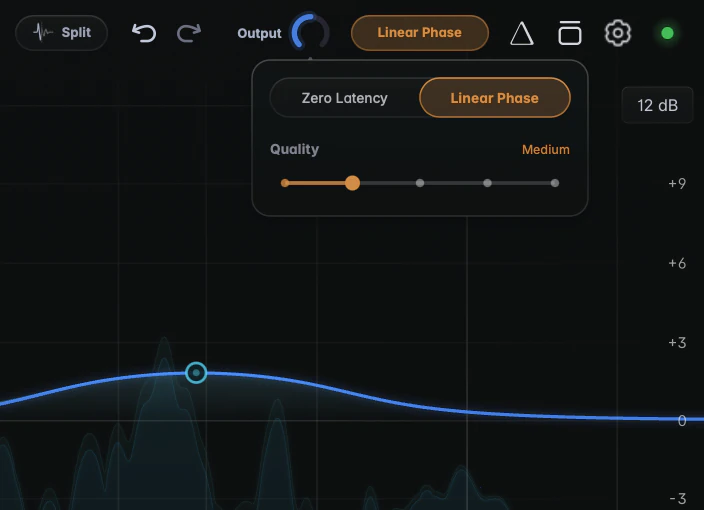
Click the pill to open the Processing popup. Choose Zero Latency or Linear Phase, and set the Linear Phase Quality on the rail below: Low, Medium (the default), High, Very High or Maximum.
Zero Latency
Zero Latency is the default. Every band is a minimum-phase filter, the same family as analog and most digital EQs, and the filters add no delay (a few features add their own; see Latency).
The tradeoff is phase shift: around every boost, cut or slope, some frequencies come out slightly later than others. This matters when the EQ’d signal meets another version of itself:
- a mic that has to stay phase-coherent with other mics on the same source, such as a drum kit;
- parallel processing;
- mid/side work, where a phase shift on only the Mid or only the Side can slightly change the stereo image;
- steep low cuts on a full mix or master.
Linear Phase
Linear Phase delays all frequencies by exactly the same amount. The curve is identical to Zero Latency, but the timing between frequencies stays intact. That costs three things:
- Latency, fixed by the Quality setting (see below) and added as soon as Linear Phase is on, even with no bands. Your DAW compensates automatically, but it rules the mode out for tracking and live playing.
- Pre-ringing. On sharp attacks such as a kick or a plucked bass, a steep cut or a narrow move in the low end can add a soft “pre-echo” just before the hit. It is less noticeable with gentle, broad moves.
- CPU. Linear Phase uses more CPU than Zero Latency, and more with each Quality step.
A few kinds of band keep their own zero-latency filters while the rest of the EQ stays linear phase; see Zero Latency bands.
Quality
Quality sets the length of the linear-phase filter. A longer filter resolves narrow low-frequency curves and steep cuts more accurately, and adds more latency:
| Quality | Latency at 44.1 kHz |
|---|---|
| Low | 2559 samples (about 58 ms) |
| Medium (default) | 4607 samples (about 104 ms) |
| High | 8703 samples (about 197 ms) |
| Very High | 16895 samples (about 383 ms) |
| Maximum | 33279 samples (about 755 ms) |
At Very High and Maximum, Broadband dynamic bands automatically use their zero-latency filters, and Spectral dynamics add their own latency on top. See Latency.
Which should I use?
Start with Zero Latency for tracking, mixing individual tracks, live playing, or whenever you need the lowest latency. It avoids linear-phase pre-ringing on transient-rich material.
Switch to Linear Phase when phase shift is the actual problem: EQ on a mix bus or master, mid/side moves, steep low cuts on full mixes, or a track that has to stay locked to other mics. Then pick the Quality:
- Medium is the default starting point.
- High for narrow low-frequency cuts or very steep cuts that need more accuracy.
- Low for broad, gentle tonal moves when you’d like to keep latency down.
- Very High and Maximum only for the rare job that needs extreme low-frequency precision and can live with a third to three quarters of a second of latency.
If in doubt, flip between the modes on a loop and listen to the attacks. If you can’t hear a difference, take the lower latency.
Notes
- Mode and Quality are saved with your session and in presets, so loading a preset can change the latency. They can’t be automated.