Dynamic EQ
A dynamic band changes its gain when the detector level exceeds the threshold. For a bass note that is louder than the others, a dynamic cut can reduce that range when it crosses the threshold rather than applying a constant cut. Any Bell, Low Shelf, High Shelf, Tilt Shelf or Flat Tilt band can be dynamic, and all 24 bands can be dynamic at once.
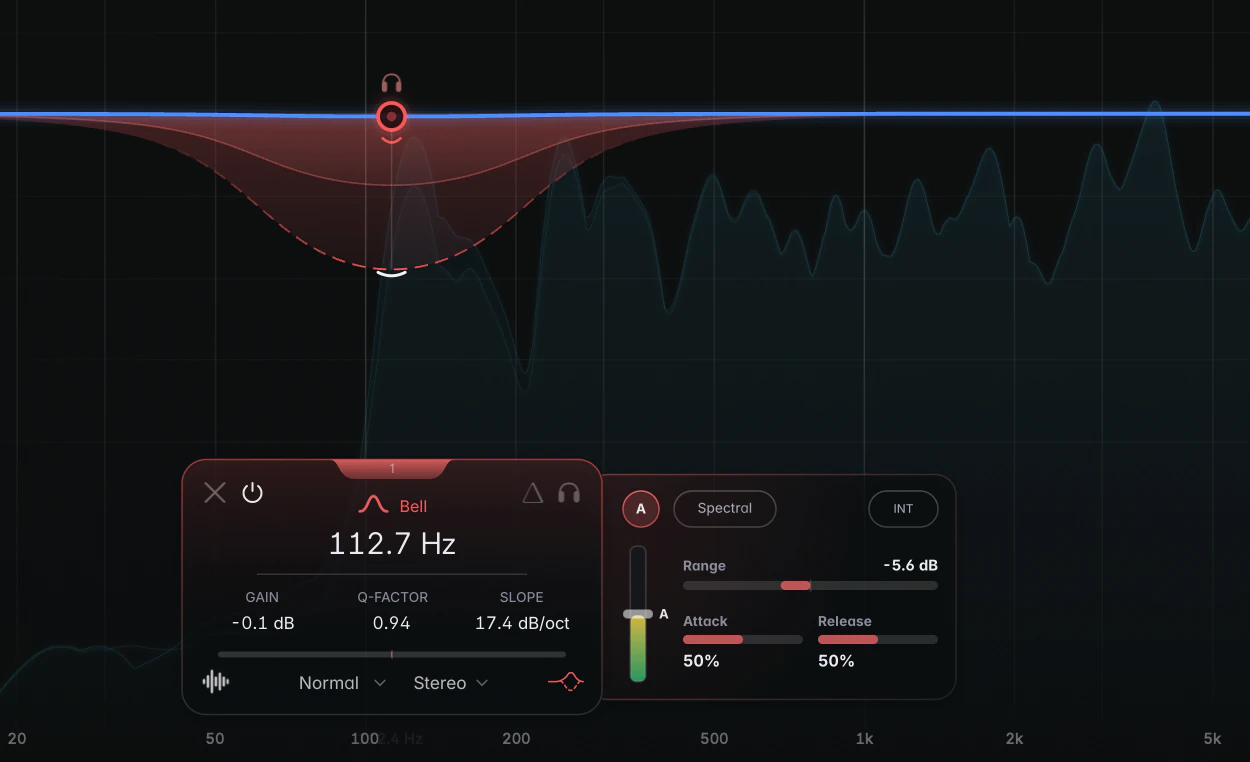
Turning dynamics on
- Click the Dynamics icon (the wave) at the bottom right of the band card. It lights up in the band colour while dynamics are on.
- Or drag the Range handle, the slim arc next to the node of a selected band. Dragging it switches dynamics on and sets how far the band may move.
- Double-click the Range handle to switch dynamics on or off.
Hold Alt (Option on macOS) while you drag or double-click the handle to switch on straight into Spectral mode. Switching dynamics off keeps every setting, so you can flip the icon to compare. The controls are in the Dynamics panel.
Cut or boost
The band rests at its normal gain. When the level rises above the threshold, the gain moves away from there by up to the Range:
- A negative Range cuts (the default is -6 dB): the band reduces gain above the threshold, for example to reduce boom, harshness or sibilance.
- A positive Range boosts: the band increases gain above the threshold, for example to emphasise a snare’s attack.
A positive Range doesn’t lift quiet passages: both directions react to level going above the threshold.
Broadband or Spectral
Choose the mode with the Spectral pill in the Dynamics panel.
- Broadband moves the band’s whole gain as one, following its shape, and adds no latency. Use it for an intermittent level increase in one range: a boomy bass note, a kick whose low end swells on some hits, or sibilance around 5 to 9 kHz.
- Spectral works frequency by frequency inside the band, turning down narrow peaks that stand out above their neighbours. Use it for resonances whose frequencies change within a region. It usually adds latency; see Spectral dynamics.
As a starting point, use Broadband for one intermittent problem range, and Spectral for changing resonances within a wider region.
Example: a boomy note on a bass
- Create a Bell band, boost it a few dB with a narrow Q and sweep until the boomy note jumps out. Set the gain back to 0 dB.
- Click the Dynamics icon. Start with the defaults: Broadband, Auto Threshold on, Range -6 dB.
- Play the track: the band should dip only on the problem note. Deepen the Range if the note still pokes out, or raise the Threshold if the band also grabs neighbouring notes.
What you see on the graph
A dashed outline shows the band’s full Range. During playback, a Broadband band’s brighter fill shows its gain movement; a Spectral band shows a ridge tracing the reduction. To change the Range, drag the Range handle; drag it across the node to switch between cut and boost.
Tips
- Turn on Band Delta on the band card to hear only what the band takes out or adds. See Solo, Hold to Listen and Delta.
- For sibilance, try a Broadband High Shelf or Bell around 6 to 8 kHz with a low Attack setting. It works much like a de-esser.
- To react to another track, such as ducking a bass under the kick, see Sidechain.