Per-band saturation
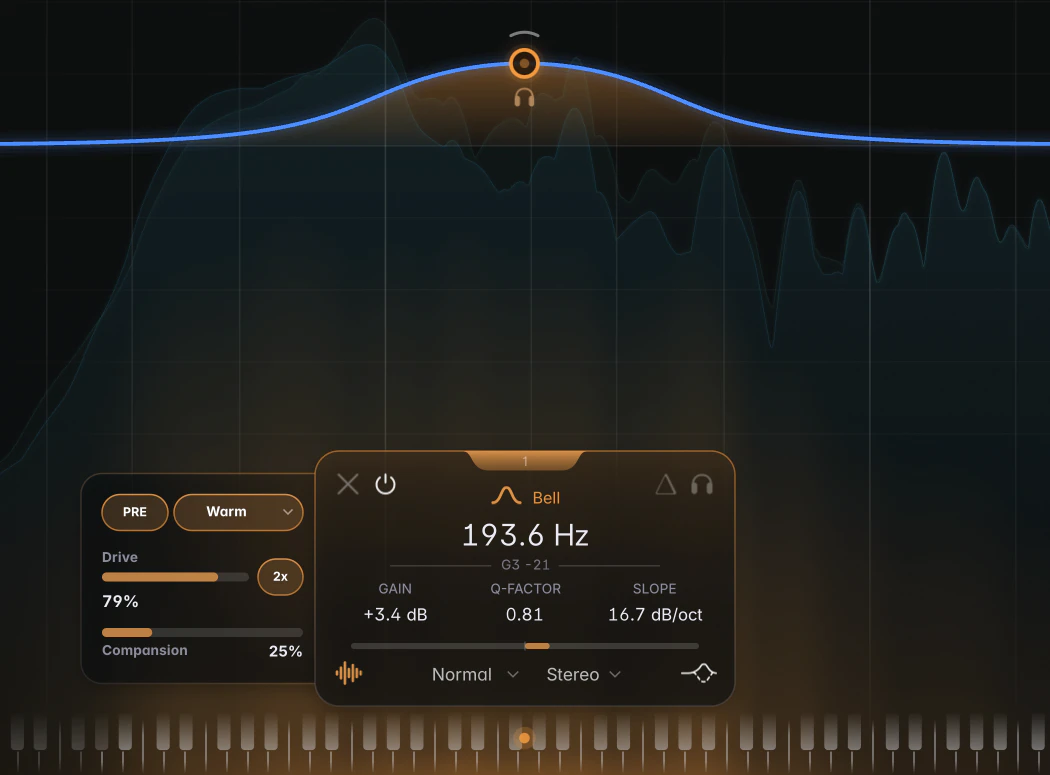
Per-band saturation processes the frequency range of a Bell, Low Shelf or High Shelf band, with four styles to choose from. For example, a Bell around 200 Hz at 0 dB can add harmonics from the bass’s low-mid range without driving the rest of the signal into the saturator.
Band-limited saturation
Only the band’s own region, set by its frequency, Q and slope, is driven into the saturator; the rest of the signal bypasses it. On a Bell that’s the region around the centre frequency, on a Low Shelf everything below the shelf frequency, and on a High Shelf everything above it. The region doesn’t depend on the band’s gain, so saturation also works with a Bell at 0 dB.
The harmonics the saturator creates are added to the full-range signal, so a low Bell driven hard can add content far up the spectrum.
Switching it on
Click the saturation icon at the bottom left of the band card. It takes on the band colour and the Saturation panel slides out on the left side of the card.
Up to 3 bands can saturate at once. With three already on, the icon is greyed out on the other bands. Bypassing a band bypasses its saturation too.
The Saturation panel
- PRE / POST: where the saturation sits in the band. PRE (default) saturates the signal before the band’s EQ, so the boost or cut then shapes the saturated signal. POST saturates after the EQ: what you boost is what gets driven.
- Style (default Warm):
- Warm: a tube-style stage, mostly second harmonic, with gentle compression.
- Tape: a tape-style curve that softens the top end as the level rises.
- Soft: symmetric saturation with a denser harmonic spectrum.
- Crush: hard clipping.
- Drive: how hard the band hits the saturator. 100 % is 15 dB of drive (default 20 %, which is 3 dB). The 2x pill next to it doubles the range to 30 dB.
- Compansion (0 to 100 %, default 25 %) evens out saturation across loud and quiet passages while preserving the band’s original dynamics. At 0 % it’s off, and louder moments saturate more than quiet ones, as with a plain saturator. Higher settings make saturation more uniform.
With several saturated bands selected, the panel edits them all.
Automatic level handling
Input and output levels are handled automatically; there are no trim knobs. Saturation depends mainly on Drive rather than the track’s level. The output is level-matched for on/off comparisons. Increasing Drive changes the saturation rather than mainly increasing volume, though high Drive includes a small level increase.
On the graph
While a band saturates, a heat glow rises from the bottom of the graph, showing where the new harmonics land. A thin ember strip along the bottom edge marks the band’s saturated region and gets brighter with more Drive.
Tips
- Saturate one layer: saturation works on Transient and Body bands too. A Body band on a bass saturates the sustain layer rather than the attack layer. See Transient / Body split.
- Saturation follows the band’s channel routing: on a Side band, only the side signal is saturated.
- To reduce aliasing at high Drive, switch on HQ mode.
Notes
- A saturated band always uses its zero-latency filters, even in Linear Phase mode. See Zero Latency bands.
- Drive and Compansion can be automated. The saturation switch, Style, PRE/POST and 2x are saved with your session and in presets, but can’t be automated.